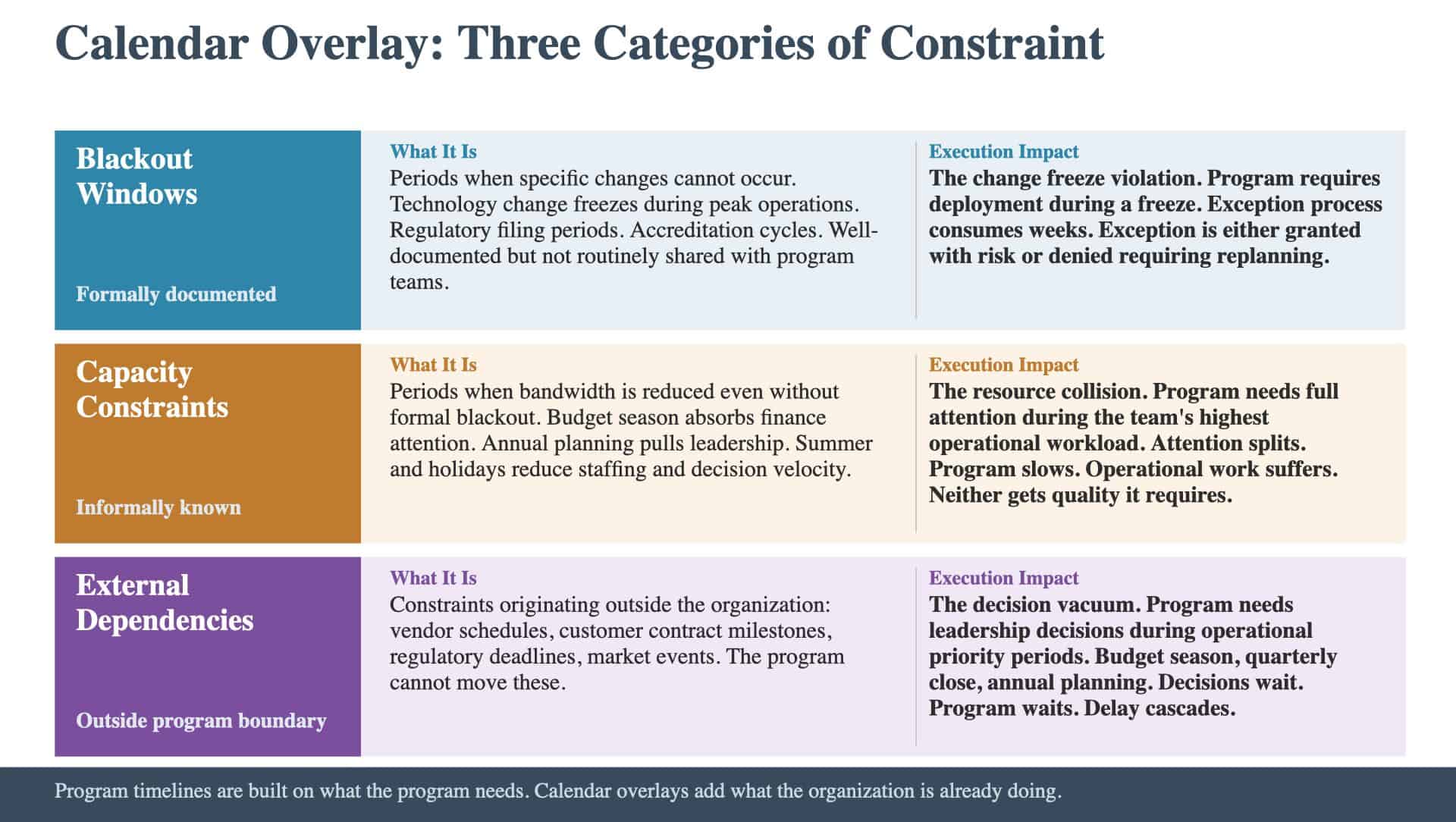
Program timelines are built on what the program needs: milestones, dependencies, resource requirements, and delivery dates. They are typically constructed by looking inward at the initiative and sequencing the work logically. Calendar overlays add a different dimension: what the organization is already doing. The operational calendar, the budget cycle, the regulatory filing schedule, the vendor contract timeline, the seasonal capacity fluctuations that every organization experiences but few programs account for in their plans. The gap between a program timeline and a calendar overlay is where timing collisions originate. A technically feasible timeline that ignores operational constraints produces a plan that will be corrected by reality during execution. The correction is always more expensive than the accommodation would have been.
Why Program Timelines Ignore Operational Reality
Program timelines are built by program teams. Program teams focus on program work. They sequence milestones, map dependencies, and calculate the critical path. The planning process looks inward at the initiative. The operational calendar is owned by the business. It includes holiday freezes, regulatory filing periods, budget cycles, quarterly closes, annual planning periods, seasonal peaks, and vendor contract milestones. This calendar is not secret. It is available to anyone who asks. But the program planning process does not typically include a step that asks. A few organizational patterns explain why: Functional separation. The program team and the operational teams are different groups. The program team builds the timeline. The operational teams manage the calendar. Neither routinely shares their planning artifacts with the other. The assumption is that conflicts will be surfaced when they become relevant. They become relevant too late. Optimism about capacity. Program timelines assume that the resources identified in the resource plan will be available when needed. In practice, those resources are also fulfilling operational responsibilities. Their availability fluctuates based on the operational calendar. A finance analyst allocated to the program during Q4 close may be available in theory but unavailable in practice. Milestone focus. Program planning focuses on milestone dates. Operational planning focuses on operational periods. The two planning artifacts use different units of time. Programs think in milestones and sprints. Operations thinks in quarters, seasons, and cycles. The calendar overlay translates between the two. The risk nobody put on the register documents cases where timing collisions were the risk that nobody registered because the planning process did not include a mechanism for identifying them.
What the Calendar Overlay Maps
The calendar overlay adds three categories of constraint to the program timeline. Blackout windows. Periods when specific types of changes cannot occur. Technology change freezes during peak operational periods. Regulatory filing periods when finance resources are unavailable. Accreditation cycles in healthcare when clinical workflow changes are prohibited. Blackout windows are typically well-documented but not routinely shared with program teams. The quality bar: the overlay identifies every blackout window that affects any function contributing to the program. If the program’s data migration requires IT resources, and IT has a change freeze in November, the overlay maps that constraint against the data migration timeline. Capacity constraints. Periods when organizational bandwidth is reduced even if no formal blackout exists. Budget season absorbs finance and leadership attention. Annual planning cycles pull strategic resources. Summer months reduce available staffing. Holiday periods reduce decision-making velocity as key leaders are unavailable. Capacity constraints are harder to map than blackout windows because they are less formally documented. The overlay requires input from operational leaders in each function: when are your people realistically less available? The answers are often different from what the resource plan assumes. External dependencies. Constraints that originate outside the organization: vendor implementation schedules, customer contract milestones, regulatory deadlines, and market events. The program’s timeline must accommodate these external constraints because the program cannot move them. The complete deliverable map describes how the calendar overlay connects to upstream planning artifacts by identifying which deliverables must fit within which timing windows.
How Timing Collisions Manifest During Execution
Timing collisions produce predictable execution-stage patterns. The resource collision. The program needs a team’s full attention during a period when that team’s operational responsibilities are at their highest. The team splits its attention. Program work slows. Operational work suffers. Neither gets the quality it requires. The change freeze violation. The program’s timeline requires a deployment during a change freeze period. The program team requests an exception. The exception process consumes weeks of negotiation. The exception is either granted (with risk) or denied (requiring timeline replanning). The decision vacuum. The program needs leadership decisions during a period when leadership attention is consumed by operational priorities. Budget season, quarterly close, annual planning. The decisions wait. The program waits. The delay cascades. Programs that failed with good plans documents timing collisions across industries. The pattern is consistent: the collision was foreseeable with a calendar overlay. Without one, it was a surprise.
What “Complete” Looks Like
A calendar overlay is complete when it passes three tests:
- Every contributing function’s operational calendar is represented. If Finance, IT, Operations, and Commercial are contributing resources, all four functions’ calendars are mapped.
- Capacity constraints are included, not just blackout windows. The overlay reflects realistic bandwidth, not just formal restrictions. If Q4 is the organization’s busiest period, the overlay reflects reduced capacity even if no formal freeze exists.
- The program timeline has been adjusted. The overlay is not just a reference document. It has produced specific changes to the program timeline: milestones moved, buffers added, resource plans adjusted. If the overlay produced no changes, either the original timeline was unusually well-aligned with operational reality, or the overlay was not taken seriously.
Why pre-mortems change the conversation explains how the pre-mortem identifies timing risks that the calendar overlay then quantifies. The question is whether your program timeline will account for what the organization is already doing: or whether your team will discover the collisions during execution, when adjusting the timeline costs months instead of hours.
Keep Reading
New to the Risk Landscape? Start with the foundations:
Ready to benchmark your work against best-in-class? See what excellence looks like: